Wednesday, January 30, 2013

Oracle ESS Jobs Thread Allocation


Oracle Enterprise Scheduler includes a Request Processor component, which represents a single Managed Server in the Oracle Enterprise Scheduler cluster. Request Processors process job requests, such that job execution is connected to one or more request processors. Oracle Weblogic Server “Work Managers” helps ESS to prioritize work and allocate the threads for job execution, through configuration of a Work Assignment and binding the Work Assignment to a Request Processor.

A little background on how WebLogic Server (WLS) handles requests by assigning them execute threads.  WLS uses the concept of Work Managers to provide applications a way to control thread utilization. Oracle WebLogic Server uses socket muxers, which read messages from the network, bundle them into a package of work, and queue them to the Work Manager. The Work Manager then finds a thread on which to execute the work and makes sure the response gets back to the same socket from which the request came. WLS uses a single thread pool, in which all types of work are executed. The server prioritizes work based on rules you define, and run-time metrics, including the actual time it takes to execute a request and the rate at which requests are entering and leaving the pool.

Creating a Work Assignment is fundamental to understanding how threads are allocated to ESS job request execution and how you can limit the period during which job requests of a certain type can be processed.


      Figure: Binding Work Assignments EssWA1 and EssWA2 to ESS Managed Servers

A work assignment includes two primary components that define Request Processor constraints:
  • Specialization Rules: Define restrictions for job request processing on a request processor.
  • Workshifts: Specify temporal windows for processing job requests and thus describe the schedule for when job requests can be processed on a request processor
This combination of Work Assignment controls, including Specialization rules and Workshifts gives you the ability to select the kinds of job requests to be processed and decide how to allocate the request processor resources. For example, you can define two Workshifts: a day shift and a night shift to allocate processing for these periods. The day shift could have more resources allocated for a peak usage period while the night shift could provide a different mix for its resource allocation.

Here is a simple example on how Work Assignments can be used for 4 concurrent ESS SubRequests. This assumes that all SubRequests use the same job definition and that job definition is not used for any other purpose.
  • Create Schedule for appropriate time period.
  • Create Workshift with 4 threads that use the Schedule.
  • Create Work Assignment specialized to that job definition, and add Workshift.
  • Bind Work Assignment to one server in exclusive mode.
Please refer the official Oracle ESS/Fusion Applications Administrators Guide for more details on managing ESS Work Assignments and Workshifts.


Friday, December 28, 2012

Generating Reports using Oracle Enterprise Scheduling Services (ESS)


Let me start of by stating that Oracle ESS does not provide any in-built mechanism or feature for generating reports. Oracle Business Intelligence Publisher (BIP) is the report generation and delivery engine for Fusion Applications and ESS simply takes advantage of this.

Here is some high level information on how ESS-BIP job submission works. The best part for application developers is that, they do not have to implement the code to invoke BIP from ESS; they just need to focus on defining the ESS job definition using  BIP or Java JobType and specify the report attributes. ESS invokes the BIP agent API to submit a job report request, which will be picked up by the BI Publisher report processors. BIP agent API implementation internally calls asynchronous web service to generate data and process all delivery channels for that job report request. As part of ESS-BIP job submission, request parameters like requestId, job definition, job package name etc are updated in the ApplSession, which is propagated to the BIP server. Callback to the configured ESS web service happens after BIP finishes a report job.

ESS global submission user interface 'Output' tab provides options through which an end user can specify layout templates for reports, document formats (PDF, RTF), and report destinations (email, fax, printer). Depending on the file management group (FMG) property set for the ESS job definition, the relevant post-processing action is selected for the job. Post-processing actions can also be invoked programmatically from a client using a Java or web service API.

Also, you might want to check out the BI Publisher report bursting capability, where in report will slice the data to generate multiple output files by identifying required format and delivery options during report runtime. Each output can be delivered to multiple delivery channels. ESS Central Submission UI allows developers to specify bursting or non bursting using property name 'outputCollection' with value 'Y' or 'N'. Value 'N' indicates that no further BI report post processing action should be allowed.

Note that Report output (bursting and regular BIP report) will be stored in BIP repository.

As always, please refer the official Oracle ESS/Fusion Apps Developers Guide for more details.

Tuesday, November 27, 2012

Oracle ESS FND Data Security


In the Oracle Enterprise Scheduling Services (ESS) world, the mechanism to protect job request information is data security. ESS relies on the Oracle Fusion Data Security technology to implement data security and enforce security authorization for a specific data record or a set of records. Data security provides access control within Oracle Fusion applications on the data a user can access and the actions a user can perform on that data.

An overview of the high level steps involved in securing ESS request data is shown below:


Note: ESS Request History Access Control feature depends on FND_GRANTS, and so depends on FND_SESSION (application session). The application user session is the session that Oracle Fusion Data Security expects to see. Creating a ViewObject using ESS REQUEST HISTORY table will bypass ESS data security, as it is not protected by Virtual Private Database (VPD); and therefore it is strongly discouraged to do so. Moreover, this approach will lead to inconsistent behavior with ESS data security model.

Remember to always check the official Oracle ESS documentation for latest information on this topic ...

Monday, October 29, 2012

Systems Perspective on Software Development Project Cycle


The “Cloud” has become the dominant global trend in Enterprise IT today and the big question for many businesses is how to transform their IT model or adapt cloud initiatives to align with their strategy, structure and processes. I would like to take a step back and take a systems approach to analyze the challenges in the current software development life-cycle. I think a systems model will help in learning about the dynamic complexity of IT development projects and understand the sources of resistance to design more effective system models/policies for cloud transformation strategies.

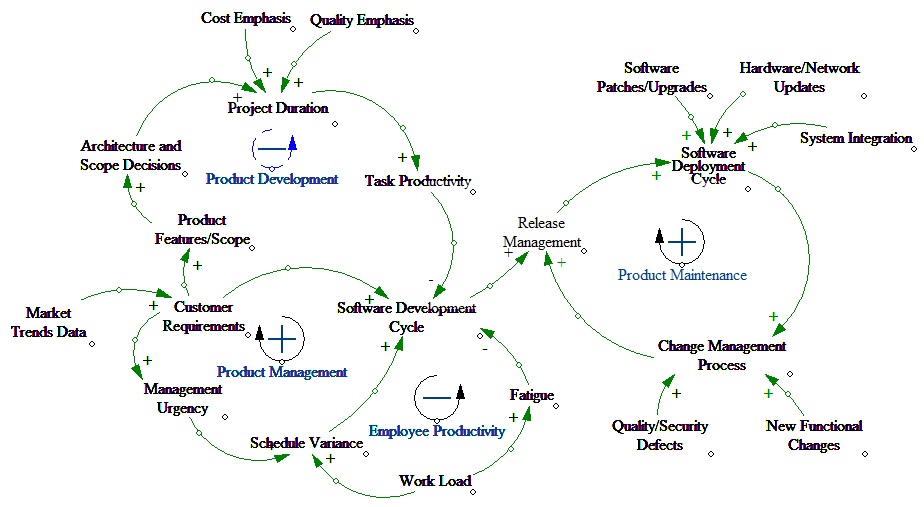
I created a causal loop diagram to understand the challenges and relationships between different variables of the IT project cycle. The intent is to include sufficient number of key variables and their relationships to represent reality.


The Causal Loop Diagram shows four important loops:
   1. Product Development (Balancing loop)
   2. Product Management (Reinforcing loop)
   3. Employee Productivity (Balancing loop)
   4. Product Maintenance (Reinforcing loop)

The balancing Product Development loop illustrates that when there is an increase in customer requirements, need for scoping the existing software functionality and architectural design decisions increase as well. The reinforcing Product Management loop suggests that perturbations such as management actions can lead quickly to major changes in project schedule, prioritization and performance.

There is one key negative feedback loop - Employee Productivity. This loop reflects the assumption that if a task falls behind schedule or there is a critical customer requirement, management will direct workers to work overtime to put the task back on schedule in order to satisfy customer deadlines. The Product Maintenance loop represents the post development maintenance activities that involve deploying the software to meet customer business requirements.


Among other things, I think one of the significant advantages for software development teams will be to leverage the cloud vendor for the infrastructural related maintenance activities. Another causal loop diagram depicting the cloud IaaS/PaaS/SaaS model will reveal the finer details. Will get to it next ...


Sunday, September 30, 2012

Linking Congruence Model of Change with Balanced Scorecard and BPM


    I recently came across David Nadler’s theory (1995) - Congruence model of Change. The proposed model is an open systems model based on the proposition that the effectiveness of an organization is determined by the congruence between the various elements of the organization. Congruence is "the degree to which the needs, demands, goals, objectives, and/or structures of one component are consistent with those of the other".

    In analyzing the applicability of the congruence model, the inputs towards say, for example IT-Cloud transformation initiative for an organization, include the external environment, internal resources (e.g. people, knowledge skills, technology stack) and the organizations’ history. Based on these inputs, the executive management formulates the strategy for initiating changes in the IT delivery model. The outputs are the performance of the various sectors of the organization after the changes are implemented. I took a systems approach to depict the broad considerations and tools that can be utilized to drive the transformation processes.


1. INPUTS – Causal loop diagrams can be a good choice here to truly understand the organizational environment and the dynamic system by observing variables and their cause of variations.
2. Strategy - Kaplan & Norton' performance measurement framework ‘Balanced Scorecard’ can be used to align business activities to the vision and strategy of the organization, improve internal and external communications, and monitor organization performance against strategic goals.
3. Process Perspective – Business Process Management is a coherent and consistent way of understanding, modeling, analyzing, executing, monitoring and optimizing business processes as well as associated resources leading to business improvement. BPMN tools offered by Oracle SOA Suite can be employed here.
4. OUTPUTS – Business Intelligence and enterprise performance management tools deliver insights to help managers make better-informed decisions and are conducive to the enhancement of key performance indicators (KPIs).


Friday, August 24, 2012

Oracle ESS SubRequests


Oracle Enterprise Scheduler Services (ESS) provides a powerful and useful mechanism to process data in parallel - "Subrequests". The common use case is to employ ESS Subrequest feature for parallel execution of child jobs. For example, parallel processing of payroll for a large number of employees can be achieved by executing subjobs or child jobs i.e one job for each letter of the alphabet.  This feature combined with ESS support for handling job dependencies (and incompatibilities - a ESS feature) will ensure that a payroll job does not run at the same time as a salary increase job.

In simple terms, an ESS job request is considered as a subrequest when a running job submits a new request, passing its own execution context. Passing the execution context ties the request being submitted to the currently running request.


Once a parent request submits a SubRequest, that parent must return control back to Oracle Enterprise Scheduler, in the manner appropriate for its job type, indicating that it has paused execution. Oracle Enterprise Scheduler then sets the parent state to PAUSED and starts processing the sub-request. Once the sub-request finishes, Oracle Enterprise Scheduler places the parent request on the ready queue, where it remains PAUSED, until it is picked up by an appropriate request processor. The parent is then set to RUNNING state and re-run as a resumed request.

In general, SubRequests are treated like any other request in regard to their processing. ESS will not automatically update the parent request status to ERROR on failure of a sub-request. It is up to the parent job to determine its own tolerance for sub-request failures and complete with the appropriate request status based on the outcome of the sub-requests.

Some important points to remember:
  • ESS does not keep any kind of "ordering" in regard to subrequests submitted by a given execution of the parent request. Once the parent pauses, the processing of subrequests is like any other request; i.e., it is subject to workassignments, incompatibilities, async throttling, available worker threads, and so on
  • There is no internal restriction imposed by ESS that limits how many sub-requests could be executing at a given time
  • ESS WebService does not support sub-request submission 
  • Cross-cluster sub-requests are not possible
Please refer the Oracle ESS Developers Guide for more details/latest information.

Monday, July 30, 2012

Monitoring application performance and stuff you can do with NetBeans and VisualVM


    "Patience is a virtue" – probably not applicable when it comes to working with enterprise web applications, where the average web/mobile user expects pages to load in two seconds or less.  The sheer complexity of IT environments handling high transaction volumes and complexity is the norm, and without application performance monitoring, it will be impossible to deliver consistent service levels.

    As enterprise Java technology becomes more and more pervasive, understanding the behavior of the garbage collector becomes extremely important to monitor/manage application performance. Garbage Collection (GC) involves traversing Java heap spaces where application objects are allocated. So, it is important to know how frequently garbage collections are occurring and the time it takes for JVM to free memory no longer utilized by application logic. Heavy or excessive garbage collection will often show up as high CPU (the threads identified in high CPU will be the GC Threads).

    The amount of time that garbage collection takes is related to the number of live objects in the heap space and not necessarily related to the size of a given Java heap size. The popular in-built or open source tools one can leverage to optimize the JVM for throughput and responsiveness are VisualVM (included with JDK 6 update 7 and later) and NetBeans Profiler.

Here is a list of performance monitoring/profiling stuff that can be performed using VisualVM and NetBeans:

  1. Capture sophisticated heap profiles using NetBeans profiler. Heap profiling is beneficial for observing frequent garbage collection and provides information about the memory allocation footprint of an application
  2. NetBeans CPU Profiling using bytecode instrumentation to profile the performance of an application
  3. Memory Profiling using VisualVM to analyze the memory usage of an application 
  4. View live heap profiling results and traverse object references using NetBeans HeapWalker
  5. Visually observe garbage collector behavior using VisualVM plugin "VisualGC"
  6. Monitor surviving generations (or object age); an increasing number over a period of time can be a strong indicator of a memory leak 
  7. Monitor Class loading and JIT compilation using VisualGC 
  8. The number of threads that are currently active within your application, along with a drilldown of what type of threads that are in use 
  9. VisualVM displays real-time, high-level data on thread activity, and thread dumps are very convenient to help diagnose a number of issues such as deadlocks or application hangs
  10. Analyze code fragment performance and identifying CPU bottlenecks using NetBeans